A lightweight alternative to Microsoft Publisher
Creating beautifully designed documents is a difficult task. Designers would probably agree that standard text editors like Microsoft Word won’t suffice. Sure, designing can be done with other software like Adobe Photoshop or Illustrator, but switching around between several programs is quite confusing in addition to being a resource hog. Thankfully, there is software like the Serif PagePlus that’s completely dedicated to publishing professional documents. Of course, the most popular software of this kind in the market is Microsoft Publisher, so can Serif PagePlus compare to the juggernaut?
Top Recommended Alternative

Installation and Interface
The installation itself of Serif PagePlus is a pretty easy process. All users have to do is download the installer file and run the program. There are a few steps that make it a bit complicated, though. During installation, users will be reminded that a restart is required, but if the program is being installed for the first time on the PC, restarting won’t be necessary. Just choose to run the program, and there won’t be any problems. The most annoying part of the installation process is the registration. Normally, I wouldn’t have a problem with registration, but in this case, all users have to do is input a number provided on the website. It just adds an additional step that’s not really necessary. Other than that minor detail, the program doesn’t have any major problems.
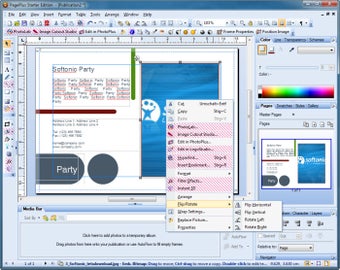
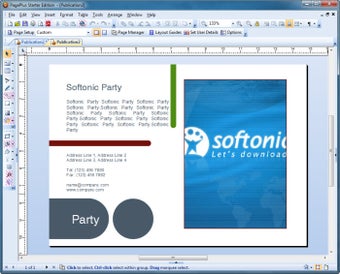
The PagePlus interface is intuitive, albeit a bit intimidating and difficult to understand at first. Users of Photoshop will find it very familiar, however. The workspace displays the blank document with the bleed indicated by blue lines. It also features ruler bars for easy measurement. There is a toolbar on the left side of the screen similar to Photoshop. On the right-hand side, there is a panel containing the various properties that users can configure when creating their documents.
Tools and Properties
The tools that PagePlus has are quite standard for a publishing software. Aside from the absolute essentials such as a selection tool, crop tool, text tool, and fill tool, PagePlus also offers some tools that are unique and necessary to publishing such as text frames, transparency, shadow, and tables.
On the right panel, on the other hand, users can adjust properties such as the color, line, transparency, and schemes. There’s also a navigation, swatch, styles, and gallery windows grouped together in the panel. Finally, there’s a window where users can configure the alignment, characters, and layers of the elements on their document.
A good alternative to Microsoft Publisher
Is PagePlus a good alternative to Microsoft Publisher? Well, it is AN alternative, but not a very good one. Considering a lot of the features of PagePlus is limited to the paid version, I’d say it would be better to splurge on Microsoft Publisher instead, especially if designing and publishing documents will be something the user will be doing frequently and professionally. If you’re going to invest time and money to learn one publishing software, it might as well be the best of the best. That said, if you don’t need a software as powerful as Publisher, this is a good software to settle on.